AI-Assisted call summaries
OneView is Rogers' internal agent platform used by Care and Retail agents across Canada. I drove the design of its AI-assisted interaction creation workflow — turning a broken 15-second documentation window into a review-first experience where AI drafts and agents confirm.
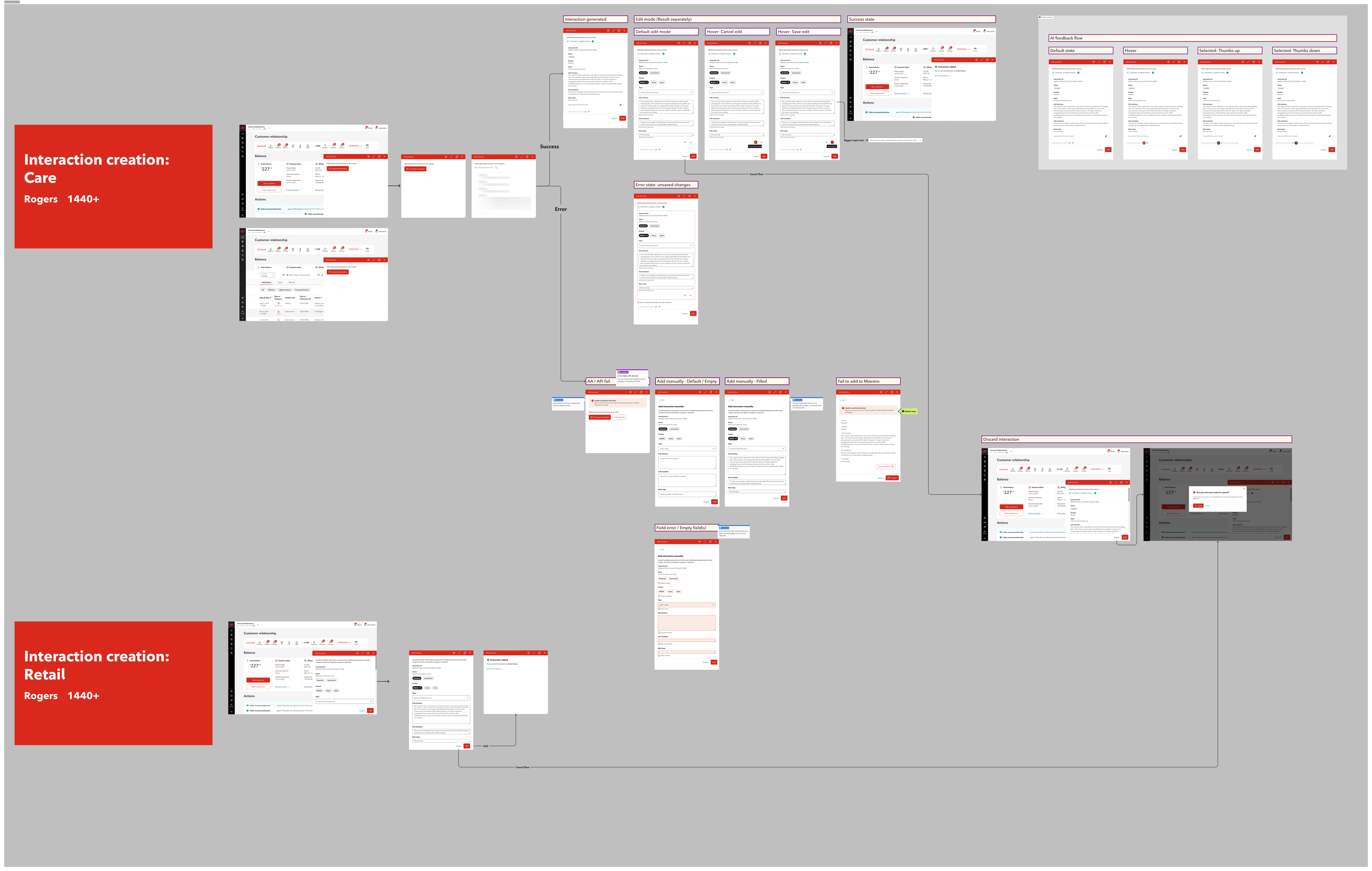 Click to view full flow ↗
Overview
OneView is Rogers Communications' internal agent platform, used by Customer Care and Retail agents to manage customer accounts and document every customer contact. An "interaction" is the official record of what happened — what was discussed, what was offered, and how it resolved — so the next agent doesn't have to ask the customer to start over.
The Problem
The business asked me to simplify the interaction creation form. But the research showed a deeper issue.
- Care agents had 30 seconds after each call to document the interaction — later cut to 15 seconds
- Agents were taking notes in personal notepads and sticky notes during calls, then copying them into OneView manually — a real privacy and compliance risk
- Notes in the system were often incomplete, vague, or categorized randomly just to meet the time limit
- The next agent to open that account had little to no useful context about what happened before
- A cleaner form couldn't fix the core issue: agents were reconstructing entire conversations from memory under time pressure
The real problem wasn't the interface. It was the workflow.
Before & After
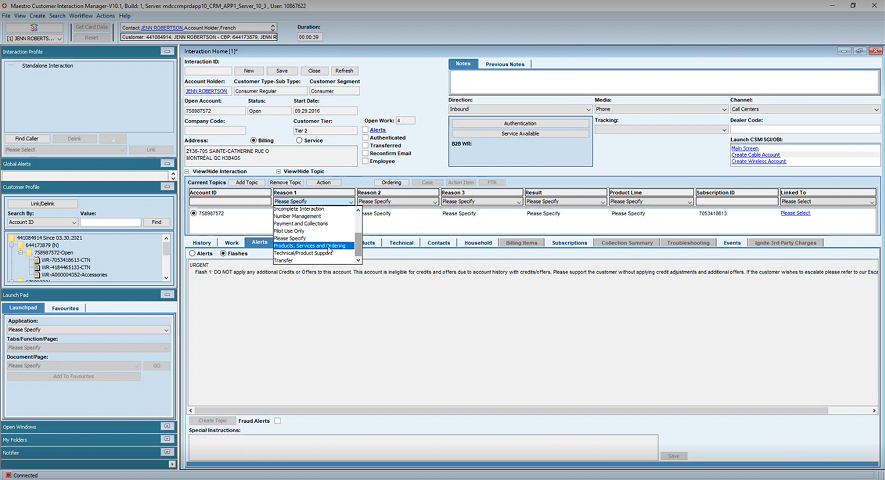
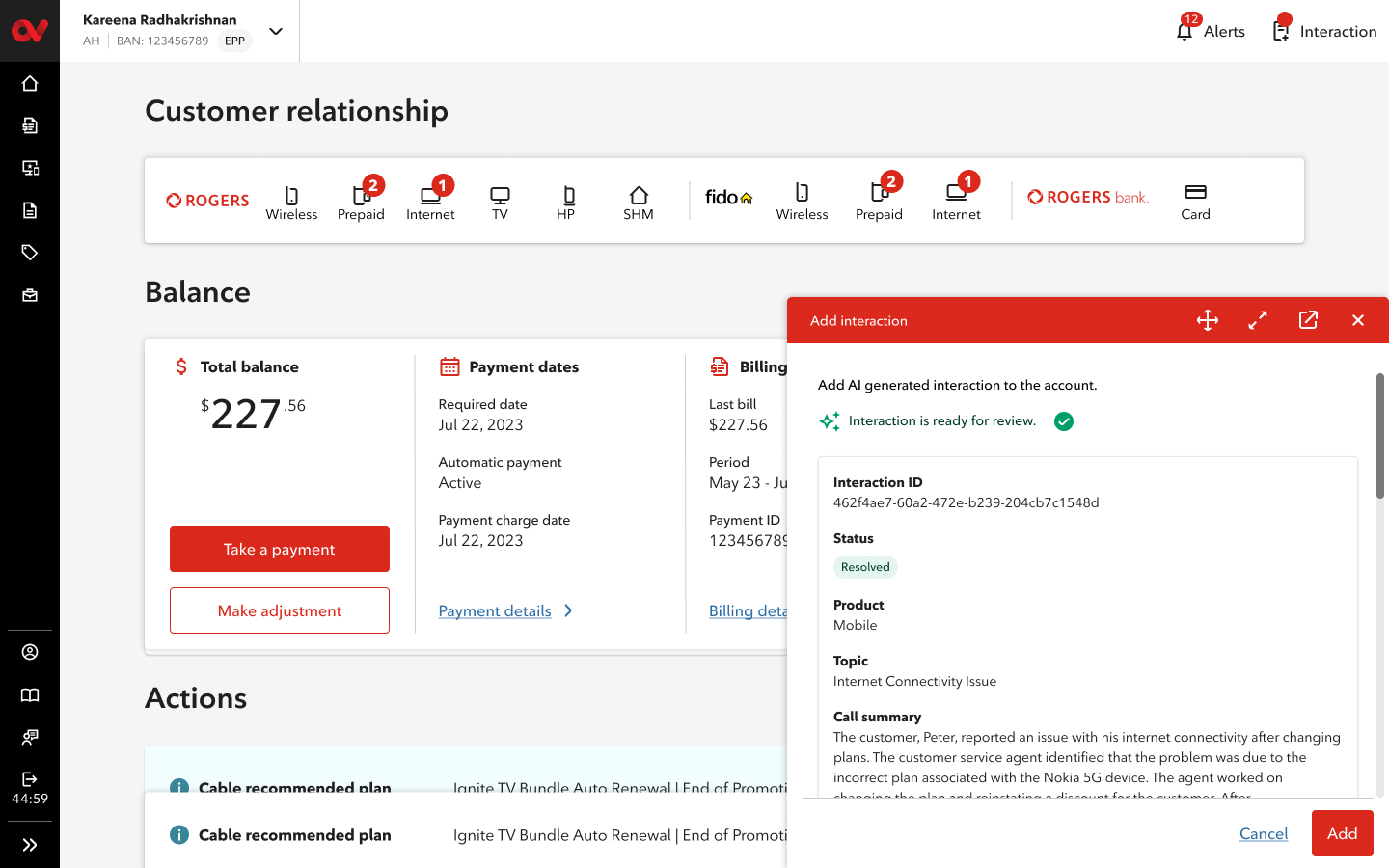
After: Flows for Care and Retail versions
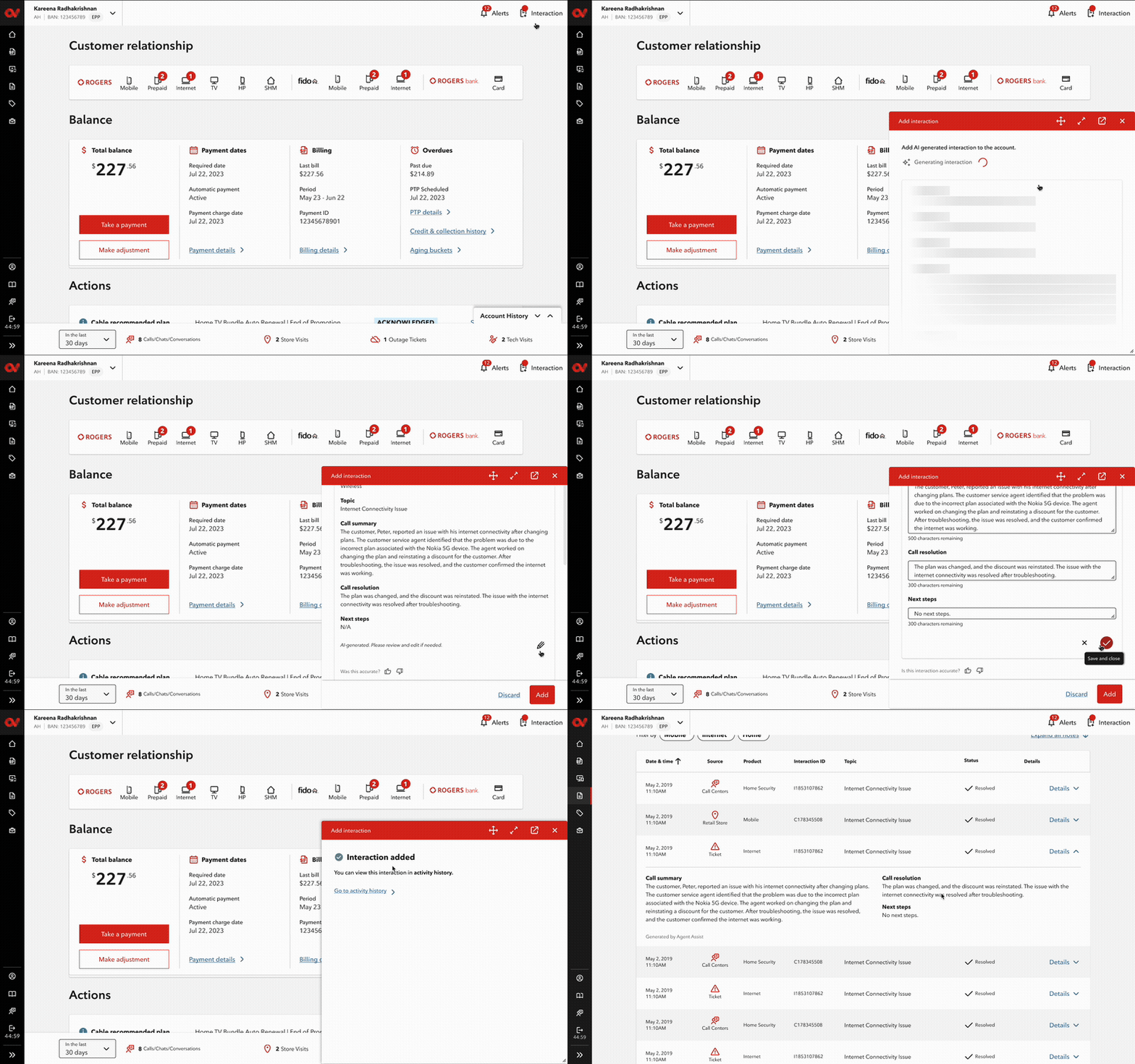
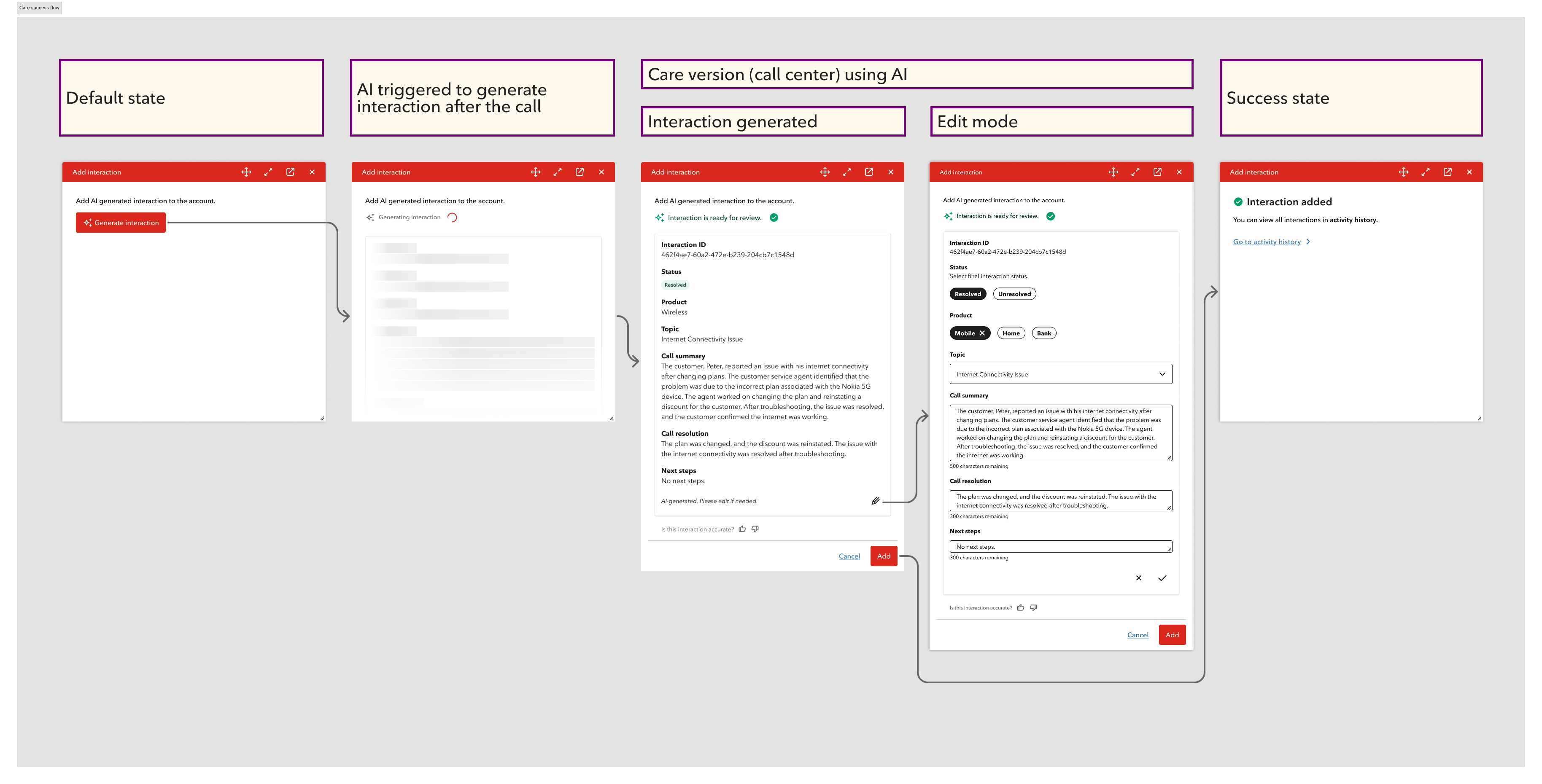
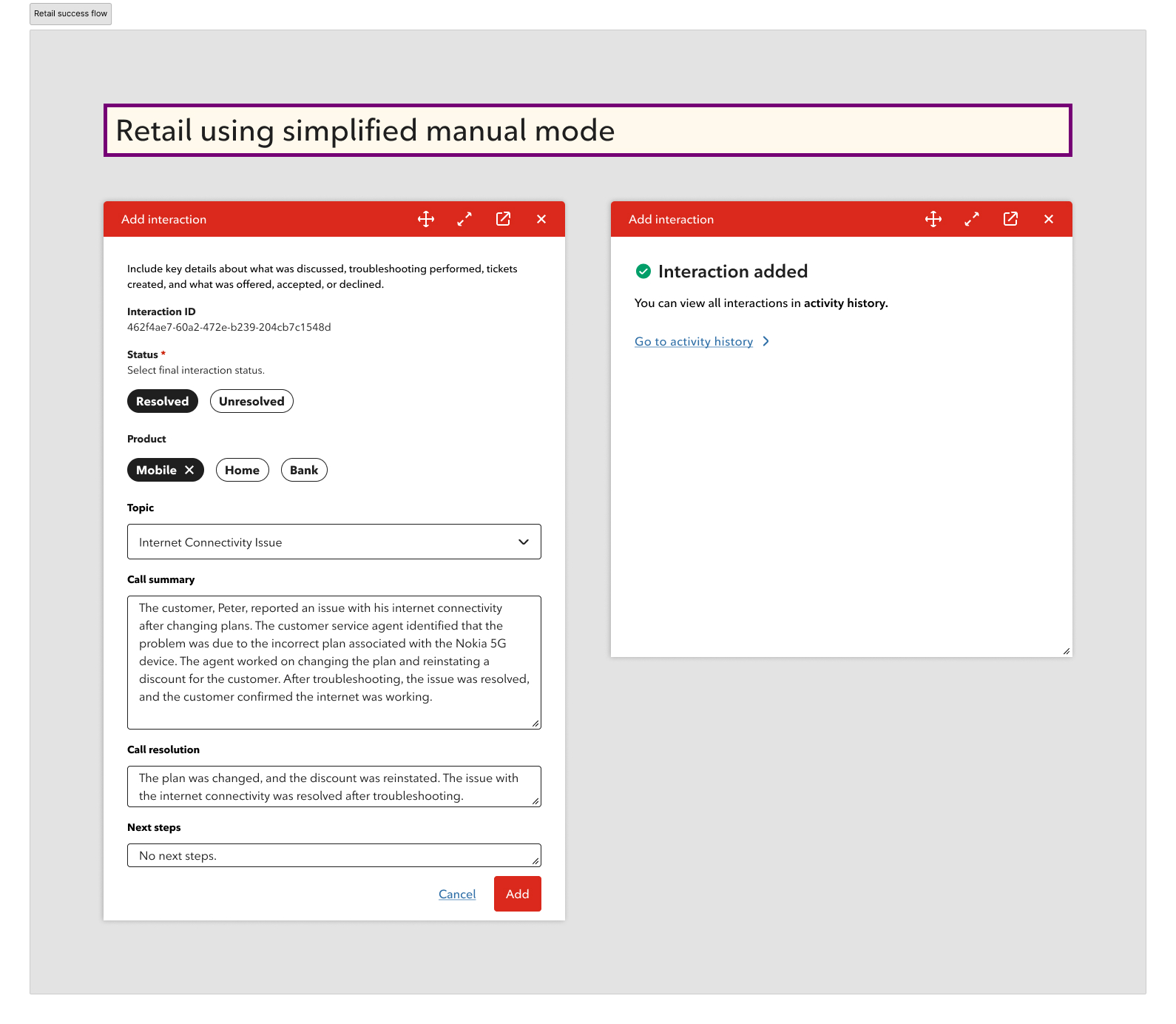
What changed
- Replaced manual post-call reconstruction with AI-generated drafts — agents review instead of write from scratch
- Introduced a consistent structure (Call Summary / Call Resolution / Next Steps) across every interaction
- Added "AI-generated" labeling so agents always know what was auto-filled and what needs their attention
- Built inline editing per field so agents can correct anything without leaving the flow
- Added agent feedback controls (thumbs up/down) so AI accuracy improves over time
- Designed a manual fallback for Retail and an API fail state — the workflow never breaks completely
My Role
I was the primary designer on this project from initial brief to final delivery. The design decisions — from the AI concept to every edge case — were mine to drive.
- Problem reframe: Identified that a simpler form wouldn't fix the 15-second documentation problem — and pushed the solution further
- AI concept: Proposed using Rogers' existing call recordings and Agent Assist to auto-generate interaction summaries
- Human-in-the-loop design: Defined the review → edit → feedback → confirm flow that keeps agents in control
- Window behavior: Designed how the interaction window floats, minimizes, and persists so agents can reference account context at any time
- Interaction history: Designed the widget and full Activity History page so better-documented interactions benefit the next agent immediately
- Error states: Designed API failure, unsaved changes, cancel confirmation, and Maestro fallback — every failure path handled
- Components & CDK contribution: Built a component library for the file and introduced a new icon button pattern and icons later adopted into Rogers' CDK library
Process
What I found in research
We conducted at least three research sessions throughout this process, alongside listening to real calls between agents and customers. All insights informed the design decisions we made.
The most focused session was run alongside a UX Researcher with 16 agents from different departments — Care, Telesales, Billing, and Support.
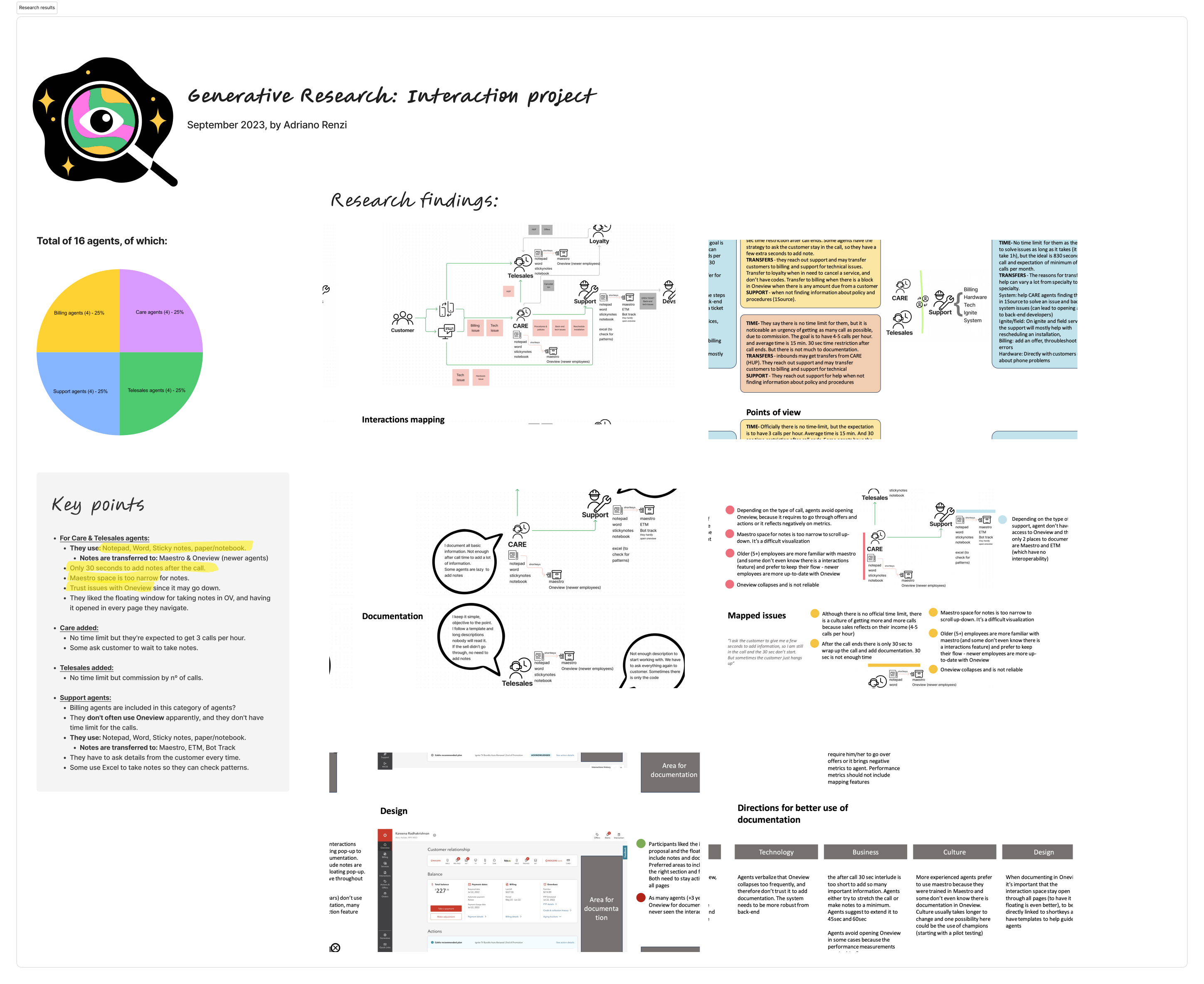
- Agents used shortkey tools and personal templates just to keep up with time pressure
- Some asked customers to wait on hold while they finished documenting
- Categories were selected approximately — the taxonomy didn't match how agents thought about calls
- Agents preferred the floating window concept — they wanted to open it on every page they navigate
- OneView instability caused some agents to avoid using it for notes altogether
A cleaner form would help. It wouldn't be enough.
First direction: improving the manual flow
Business confirmed that interaction reasons were necessary but could be simplified. Maestro had over 500 reasons across three dropdowns — something agents complained about consistently. We kept the concept per the business ask but pushed hard to reduce the selections.
I also considered a manual notes section for agents to write during the call. Research changed that thinking: OneView can crash, and agents would lose their in-progress notes. Business confirmed the AI could still access the call recording from the third-party app even if OneView went down — so real-time manual notes inside OneView wasn't the right solution.
Despite that, I kept the ability to add the interaction manually if an error occurs and the AI-generated interaction isn't possible — following the same pattern as the Retail flow, which is always manual.
The pivot: AI-assisted generation
The manual form improved the experience — but agents still had to reconstruct the call from memory. That's when I identified the real opportunity: Rogers already recorded all Care calls, and Agent Assist was already in use in chat. The pieces were there. I proposed using call recordings + Agent Assist to generate the interaction automatically.
The first explorations kept some elements in the agent's control — the AI would generate notes, but categories and product lines were still manually selected. The thinking at the time was that categorization required human judgment.
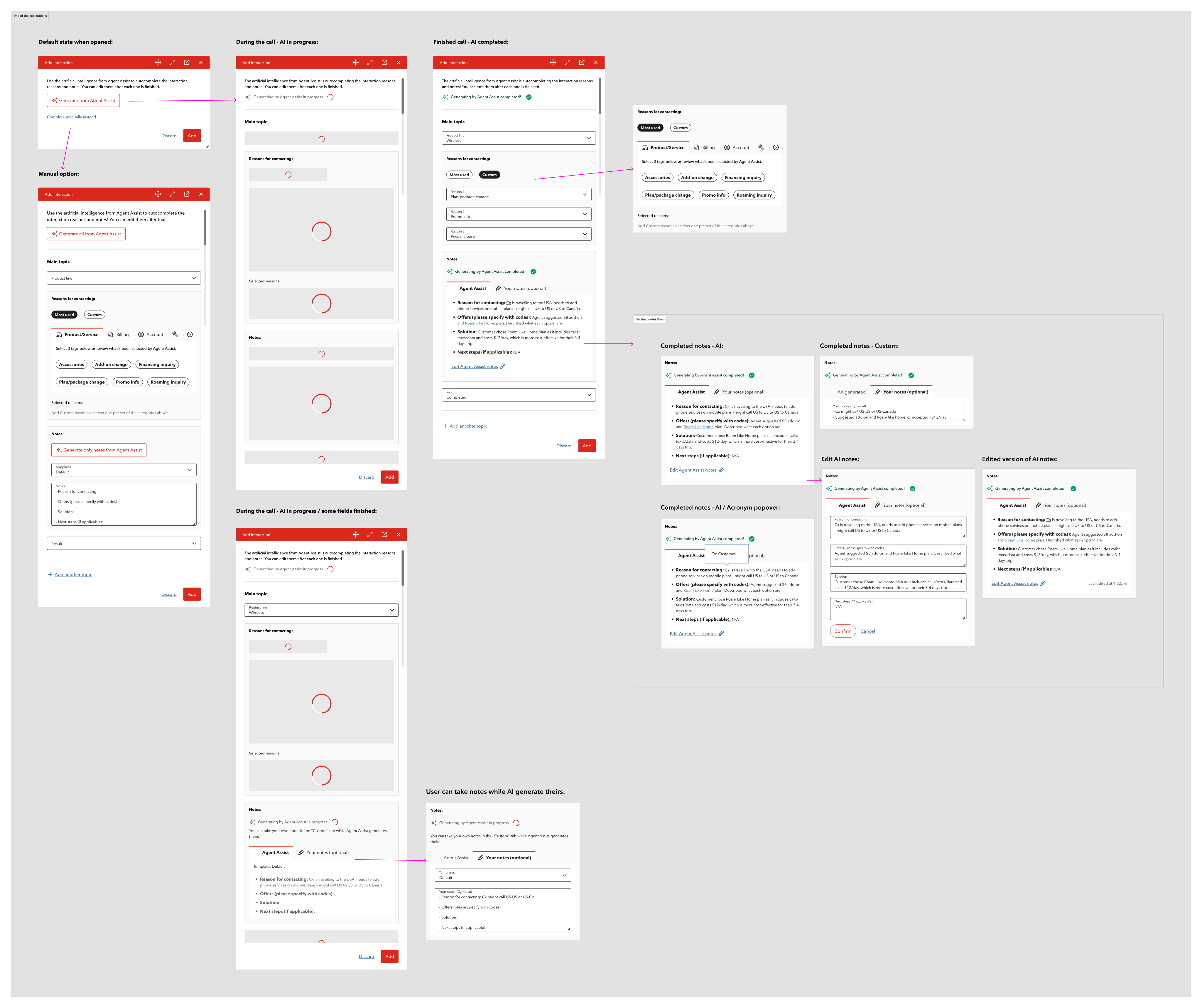
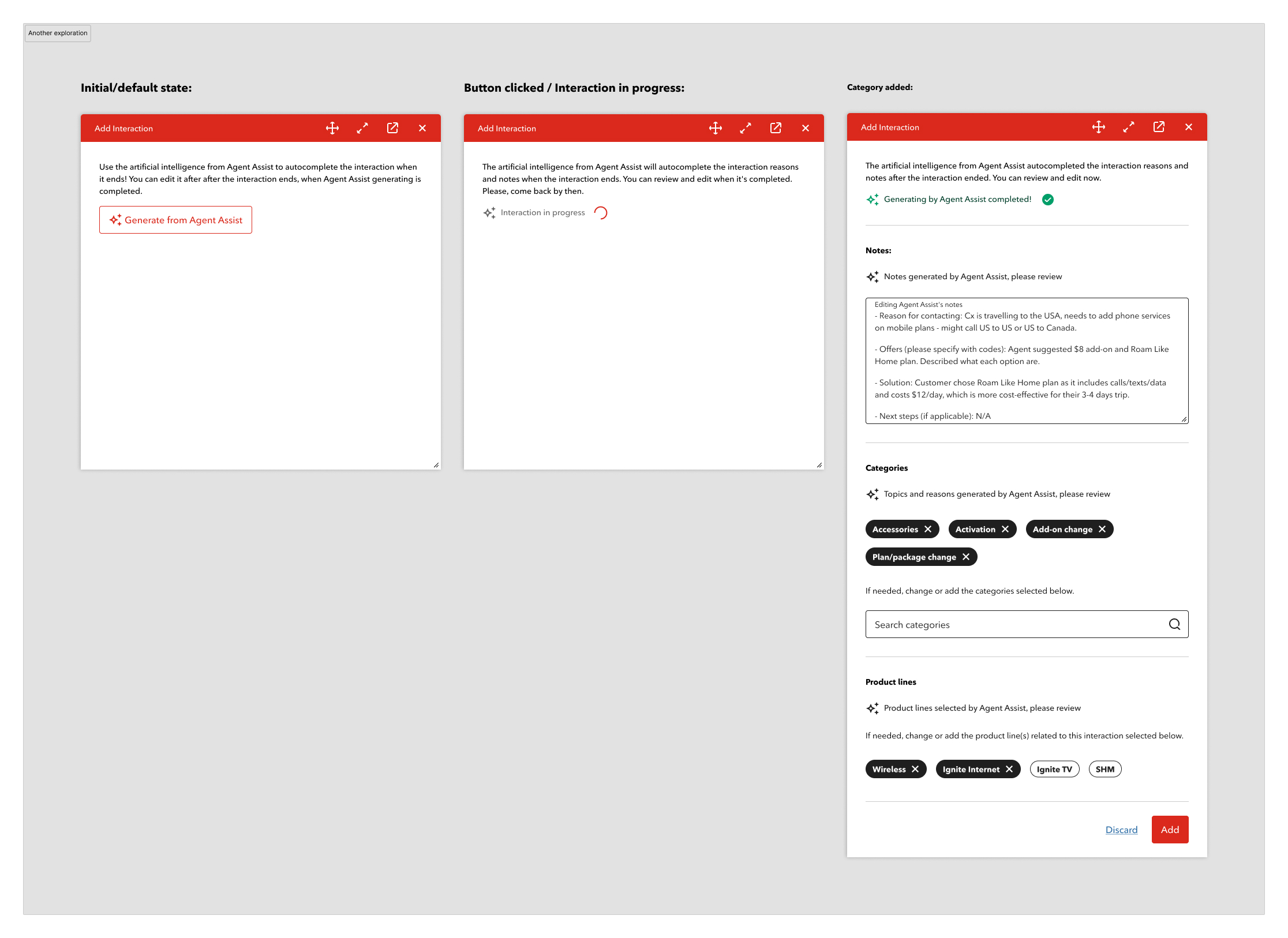
After further discussion with the AI team, they confirmed that categorization could also be automated — Agent Assist could generate topics, reasons, and product lines from the recording, not just the notes. This shifted the final design: AI first, manual entry only as a fallback if the API fails.
Designing the AI experience
The core principle: AI generates, human confirms. Never silent automation.
Key decisions:
- "AI-generated" label on every auto-filled field — no ambiguity
- Inline editing — no modal, no separate mode, no interruption to the flow
- "Last edited at [time]" timestamp when an agent modifies the summary
- Agent name attached to every submission — accountability stays with the human
- Thumbs up/down feedback attached to the review state
Error states and fallbacks
OneView can crash. APIs can fail. The design handles both without leaving agents stranded.
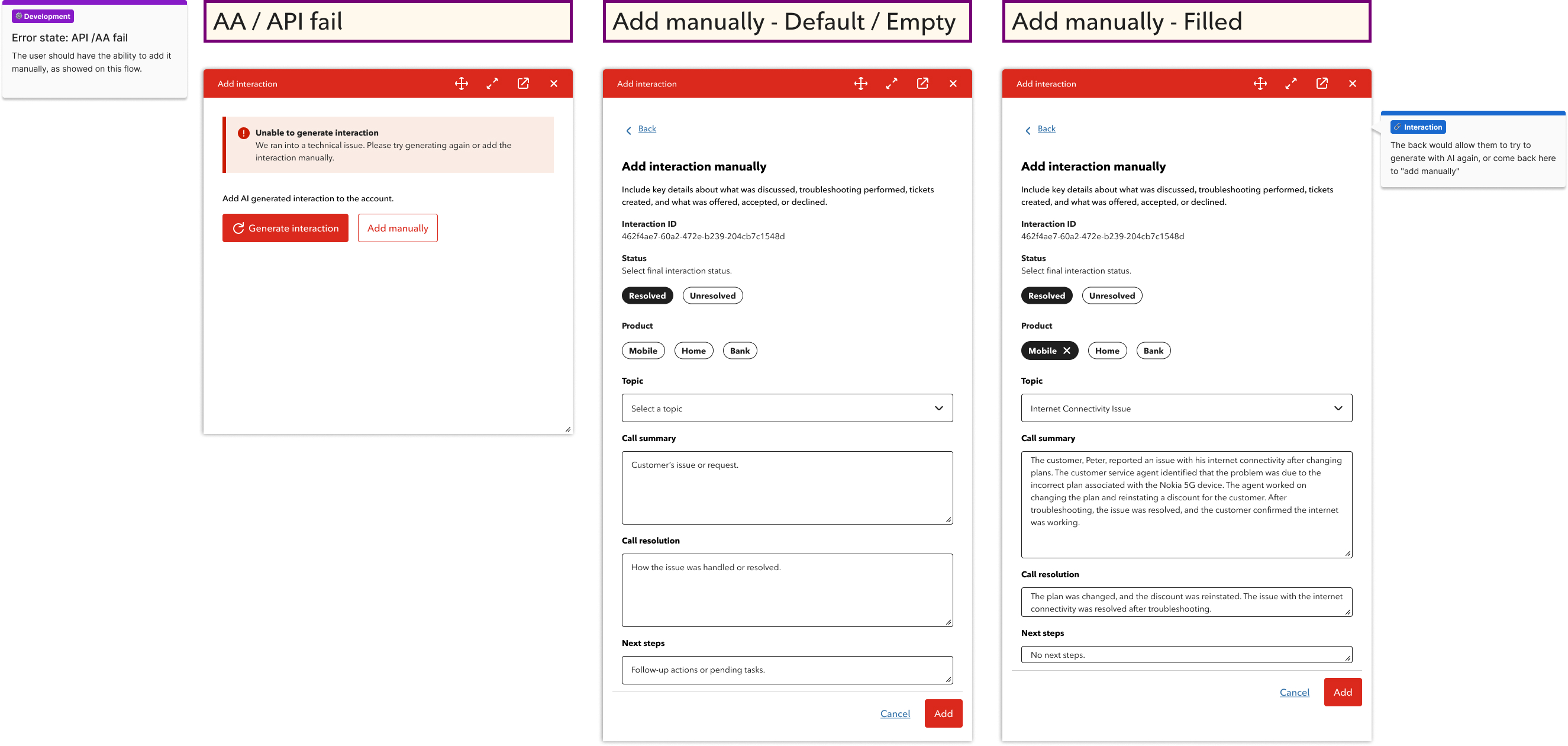
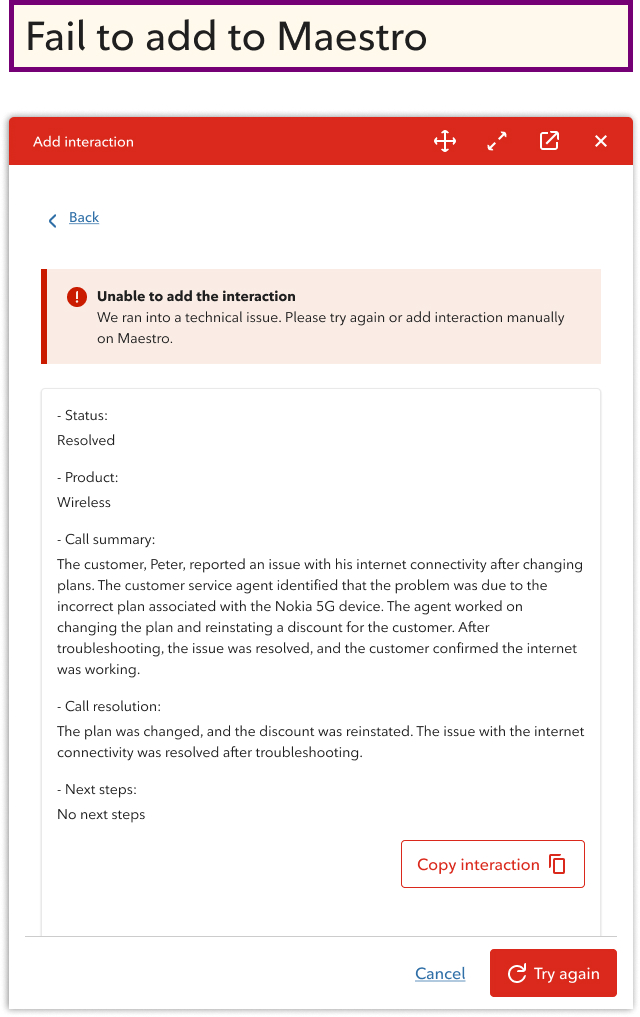
- If AI generation fails → agent can try again or add manually — no dead end
- If the interaction fails to save to Maestro → content is copied so agents can enter it themselves
- Business confirmed temporary recording is feasible, making this fallback viable
Retail flow
Retail agents work in-store with more time and no call recording. The flow is manual by design — same structured format, no AI generation.
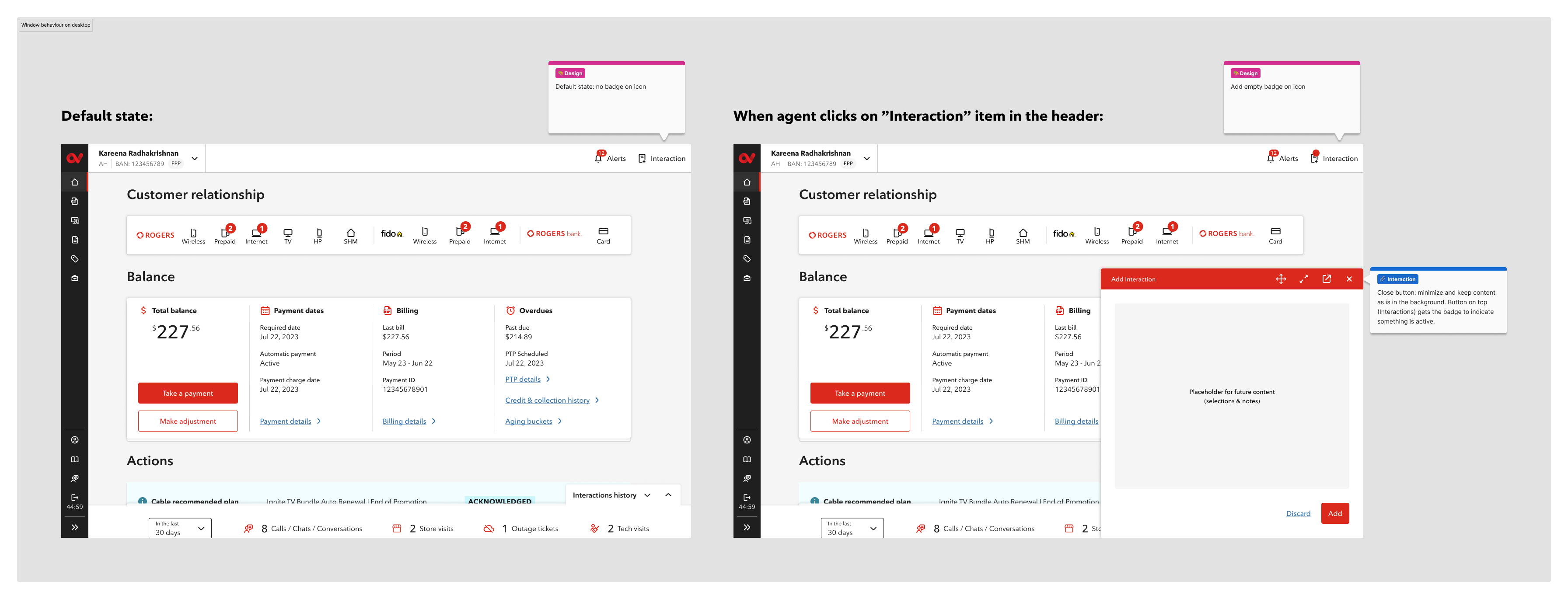
Why a floating window?
Research told us directly: agents check account information and previous interactions before submitting. A static drawer would block that context.
Most agents used third-party note apps during calls to avoid losing information. They stated they wanted a floating window that they could open on every page they navigate — not just one fixed location.
I looked at familiar floating window patterns — specifically Gmail's compose window — to inform the behaviour.
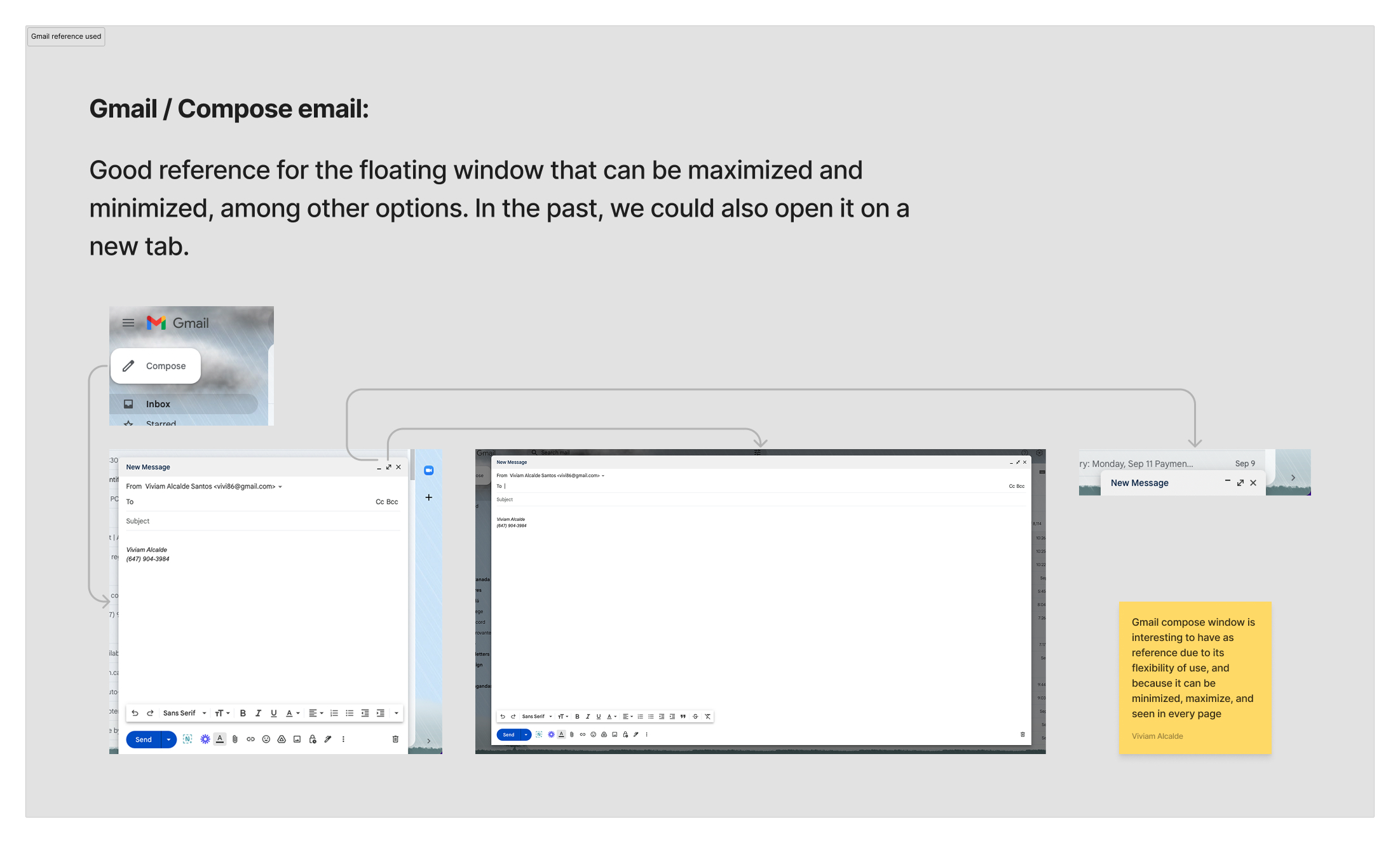
The interaction window floats, minimizes, and persists across pages. Closing saves the draft. Agents can open it from anywhere in OneView, drag it to any position, and reopen it with notes intact — whether they're reviewing an AI summary or entering notes manually.
Components and CDK contribution
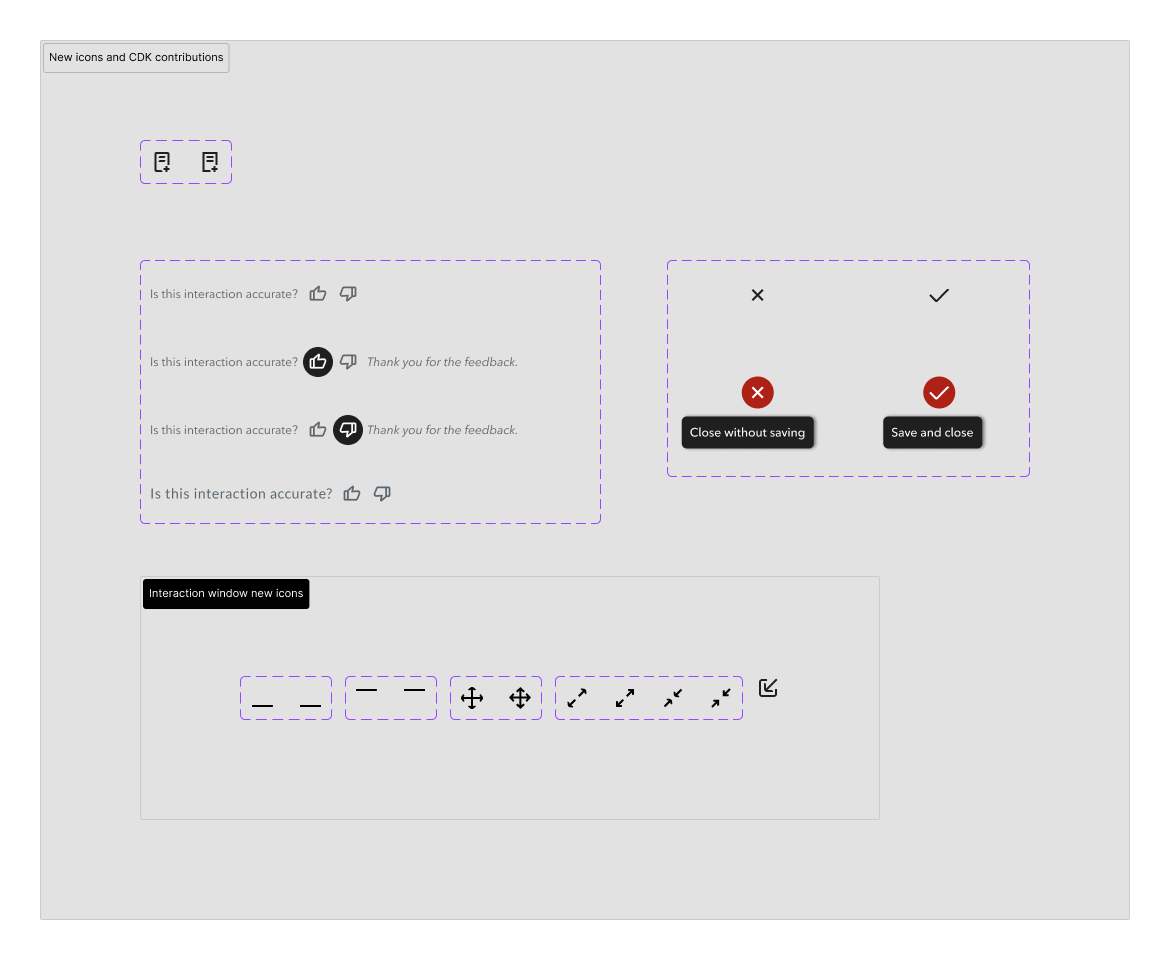
I built components throughout the file to manage changes efficiently across screens and states. Several of those contributions made it into Rogers' CDK library.
The interaction icon and all window control icons — drag, minimize, expand, fullscreen, and the interaction log icon — didn't exist in the CDK. I designed them from scratch, following Google Material icon patterns and existing Rogers CDK icons as references, and applying Rogers' visual style to keep them consistent with the broader system.
One interaction pattern I introduced — an icon button with a label that appears on hover — was later adopted by other designers and added to Rogers' CDK library. It's now used across multiple OneView features beyond this project.
Outcome
The design is complete and in active development, with the AI team involved in implementation.
The scope expanded well beyond the original brief. What started as a form simplification became a full workflow redesign — validated by product leadership and stakeholders.
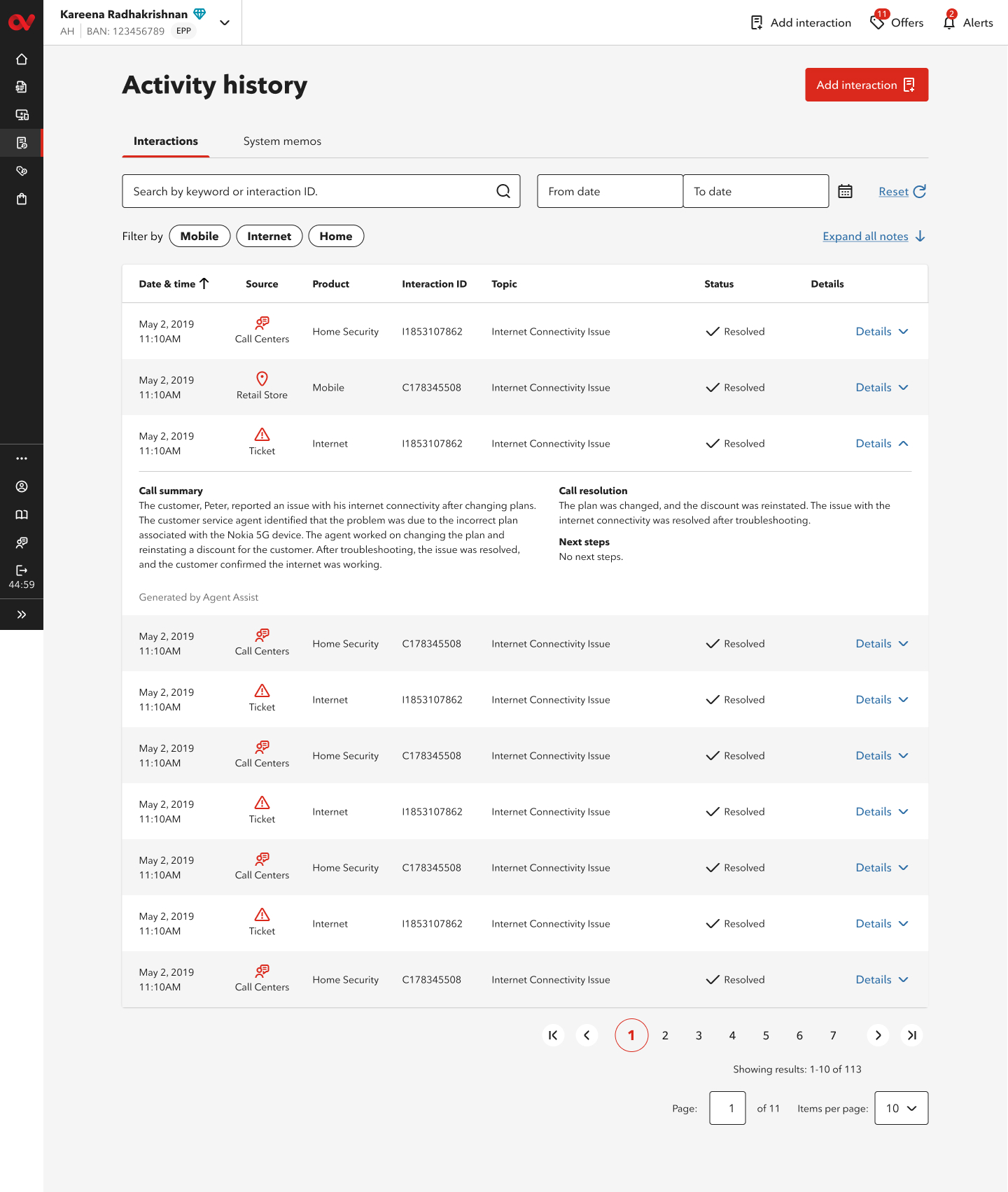
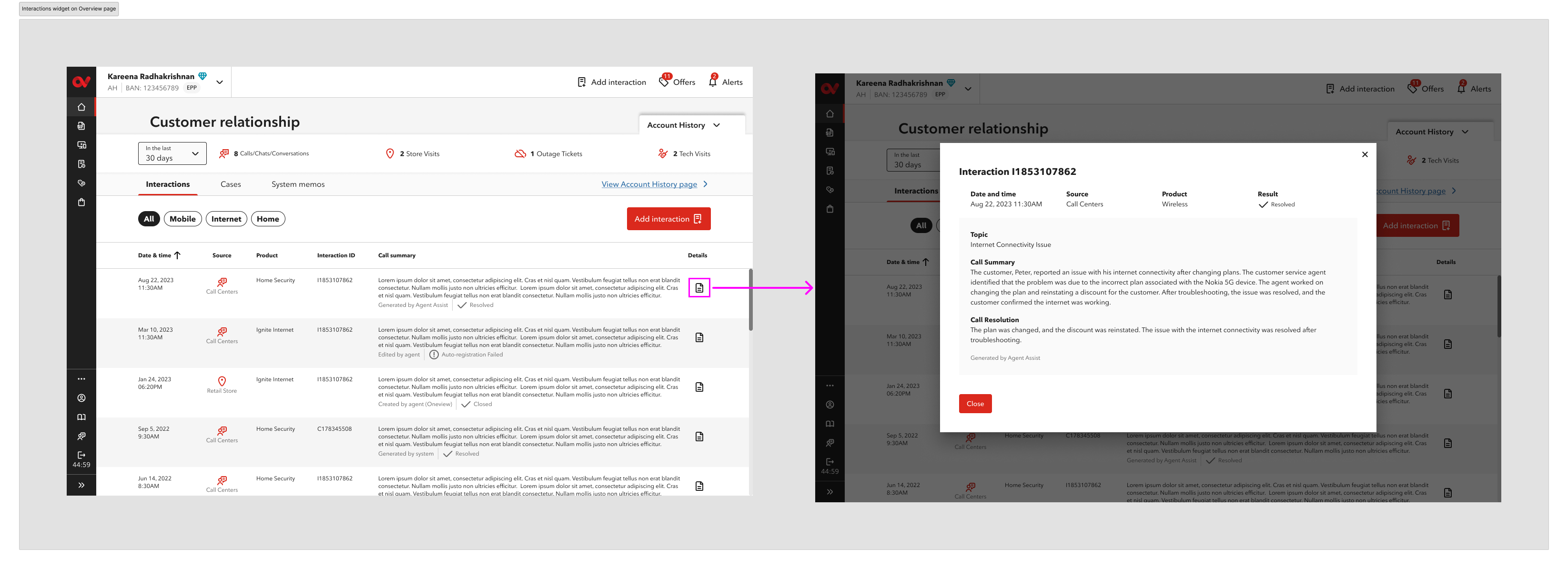
Interaction History — a direct reflection of the new format
I was the sole designer responsible for both the Activity History page and the Interactions widget — end to end, from concept to dev-ready specs.
These aren't separate features — they're the visible outcome of the new interaction format. Every AI-generated summary, every agent edit, every structured Call Summary and Call Resolution will surface here for the next agent to reference before or during a call. The "Generated by Agent Assist" and "Edited by agent" labels make the source of every record transparent.
Expected impact
- Less time spent on post-call documentation for Care agents
- Consistent, structured interaction records across all agents and channels
- Customer data stays inside official systems — privacy and compliance risk reduced
- Future agents have real context before picking up a conversation
- AI accuracy improves over time through agent feedback
Metrics and user feedback will be added once the feature reaches broader rollout.
Tools Used
- Figma
- FigJam
- Rogers CDK
- AI Interaction Design
- User Interviews
- WCAG 2.x AA